The Ultimate Showdown: Macbook Air 15 M4 2025 vs Macbook Air 13 M1 2020 for 2026
Introduction
For buyers in 2026 weighing a laptop purchase, the choice between a compact, proven classic and a roomy, modern refresh is common. On one side sits the MacBook Air 13 with the Apple M1 (2020) — the model that redefined thin-and-light performance when it arrived and remains relevant thanks to Apple's long-term software support and exceptional efficiency. On the other is the MacBook Air 15 with Apple’s M4 (2025) — a newer, larger Air that targets users who want more screen real estate and newer silicon improvements without moving up to the Pro line.
This article compares these two machines from a practical buyer’s perspective in 2026: real-world performance, battery life, portability, connectivity, creative and productivity use cases, longevity, and value. The aim is to give a clear sense of which laptop suits specific buyers today rather than just listing raw specifications.
Overview: Who are these machines for?
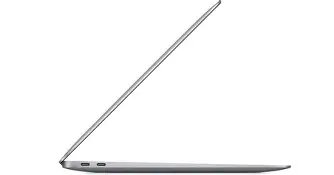
MacBook Air 13 M1 (2020) is for users who prioritize portability, proven reliability, and a low-cost entry into the Apple silicon ecosystem. Students, writers, light office workers, and anyone who values a nearly silent, fanless laptop with great battery life will find it attractive.
MacBook Air 15 M4 (2025) is for people who want a larger display while keeping the Air’s slim profile and want the newer silicon benefits: faster CPU/GPU throughput, better neural processing, and expanded memory options for heavier multitasking and content work. It is aimed at creative hobbyists, professionals who do light-to-moderate photo and video editing, and buyers who prefer a larger canvas for spreadsheets, remote work, or media consumption.
Detailed product analysis
MacBook Air 13 M1 (2020) — The compact starter that changed expectations
The MacBook Air 13 M1 arrives as a milestone: Apple’s first Mac laptop on Apple silicon. It pairs a very efficient system-on-chip with a fanless chassis, delivering surprisingly strong performance for everyday workloads. Even in 2026, its strengths remain relevant:
- Efficiency and battery life: The M1 Air is still one of the quietest and most efficient laptops in its class. For web browsing, writing, and streaming media, the battery life stays competitive thanks to the tight hardware/software integration.
- Build and portability: The 13.3-inch form factor, sub-1.3 kg weight, and thin profile make it ideal for daily commuting and long carry days.
- Software support: Apple’s long lifecycle for major macOS updates means the M1 platform remains supported for years, making it a safe buy if longevity matters.
- Real-world performance: For single-threaded tasks, office productivity, browser-heavy workflows, and moderate photo editing, the M1 still performs smoothly. Developers running light builds, students running notes and browser tabs, and business users handling email and video calls will find no friction.
Limitations become apparent in more demanding scenarios. The M1’s unified memory is capped at a configuration that may feel constrained under large datasets, long video renders, or heavy virtual machine usage. The smaller display also limits workspace for multitasking compared to 15-inch alternatives.
MacBook Air 15 M4 (2025) — Bigger screen, newer silicon, modernized Air
The MacBook Air 15 M4 brings Apple’s later-generation silicon into the Air chassis with a larger 15-inch panel, updated thermal design, and expanded configuration options. Its practical impact in 2026 includes:
- Screen real estate: The 15-inch display makes a tangible difference for spreadsheet work, side-by-side documents, and creative timelines. For remote workers and creative hobbyists, the extra pixels reduce the need for an external monitor.
- Performance improvements: The M4 generation focuses on both single-core uplift and markedly stronger GPU and neural engine performance compared to M1. This manifests as faster exports in photo and video apps, smoother behavior in web apps with heavy JS, and better performance for hardware-accelerated media tasks.
- Memory and multitasking: The newer Air typically offers larger unified memory configurations, which helps when running many apps, larger browser tab loads, or light virtualization. This makes it better suited to power users who don’t need a MacBook Pro.
- Thermals and sustained workloads: While still designed to be thin and light, the 15-inch Air’s thermal headroom and chip efficiency improvements mean better sustained performance over longer tasks than the M1 Air.
Trade-offs include slightly less portability (larger footprint, modestly heavier) and a higher entry price than older M1 models. For buyers who prioritize a compact device above all else, the 13-inch Air remains appealing.
Shop the latest Laptops & Computers picks on Amazon.
View Offers →Pros & Cons
MacBook Air 13 M1 (2020)
- Pros:
- Outstanding efficiency and long battery life for everyday tasks
- Fanless, silent operation
- Lightweight and highly portable
- Proven reliability and long software support
- Excellent value on the used and refurbished market in 2026
- Cons:
- Smaller display limits multitasking
- Memory and connectivity options are more limited compared to newer models
- Not ideal for heavy video editing or long, sustained demanding workloads
- Older webcam and microphone hardware relative to later models
MacBook Air 15 M4 (2025)
- Pros:
- Larger display improves productivity and media consumption
- Newer silicon brings better multi-core, GPU, and neural performance
- Higher memory configurations enable heavier multitasking
- Improved sustained performance for longer workloads
- Modern port and media engine features for creators
- Cons:
- Less portable than the 13-inch Air—larger and heavier
- Higher entry price than older M1 units
- Still an Air-class machine — not a full Pro substitute for demanding professional workflows
Comparison table
| Category | MacBook Air 13 (M1, 2020) | MacBook Air 15 (M4, 2025) |
|---|---|---|
| Release Year | 2020 | 2025 |
| Chip | Apple M1 (first-generation Apple silicon) | Apple M4 (later-generation Apple silicon with improved CPU/GPU and neural engine) |
| Display | 13.3-inch Retina (smaller workspace) | 15-inch Retina-class display (more screen real estate) |
| Memory (typical configurations) | 8GB / 16GB unified memory | 16GB and higher options commonly available (better for multitasking) |
| Storage | 256GB / 512GB / 1TB SSD options | 256GB and up; faster NVMe and higher capacity options more common |
| Ports | 2 × Thunderbolt / USB4 (limited native ports) | 2–3 × Thunderbolt / USB4, possibly MagSafe or enhanced charging options depending on config |
| Cooling | Fanless | Active or improved passive cooling for better sustained performance |
| Weight | ~1.29 kg (lightweight) | ~1.4–1.6 kg (larger, modestly heavier) |
| Battery Life (typical real-world) | Excellent for web/office use; lasts a full workday for light tasks | Comparable or slightly improved for mixed usage due to silicon efficiency and larger battery capacity |
| Ideal for | Students, writers, travelers, office productivity | Remote workers, creatives who want screen space, users needing bigger displays without moving to Pro |
| Launch price (approx.) | MSRP at launch: around $999 (base) | MSRP at launch: typically higher than base 13-inch models (varies by configuration) |
Real-world use cases: matching needs to machine
Students and casual users
Students who primarily use web research, note-taking, streaming, and occasional photo edits will find the MacBook Air 13 M1 a comfortable, budget-friendly solution. Its lightweight design and long battery life make it easy to move between classes and cafes. The M4 Air 15 is suitable for students who also do media coursework, run heavier project builds, or simply prefer a larger screen for multitasking — at the cost of carrying a slightly bigger laptop.
Remote workers and business users
Remote workers who manage spreadsheets, virtual meetings, and heavy multitasking will appreciate the 15-inch Air’s extra screen space and newer silicon which handles multiple video calls and browser tabs more gracefully. However, if frequent travel or commuting is a major factor, the 13-inch M1 remains compelling because of its smaller footprint.
Creative hobbyists and light professionals
For photographers, podcasters, or video editors working on short-form projects, the M4 Air offers faster exports and better GPU-assisted effects. The ability to configure more unified memory helps when working with larger image libraries or timelines. Professionals who handle pro-level 4K timelines, color grading, or complex 3D work should still consider a MacBook Pro-class machine, but many freelance creators will find the 15-inch Air a balanced choice.
Developers
Developers working with web stacks, containerized microservices, or light virtual machines will see benefit from the M4’s increased cores and memory ceiling. The M1 remains a capable development machine for lighter workloads or as a secondary device for note-taking and email while coding on a desktop or heavier workstation.
Buying guide — how to choose in 2026
Deciding between these two Macs comes down to priorities: portability vs. screen space and newer performance. Use the checklist below to clarify which factors matter most.
1. Prioritize portability and battery life
If the laptop will be carried daily in a backpack, weighed against shoulders, or used frequently in transit, the MacBook Air 13 M1 is still an excellent choice. Its lighter weight and compact size remain hard to beat for on-the-go use.
2. Demand more screen space for productivity or creative work
Choose the MacBook Air 15 M4 if the extra display size reduces friction in day-to-day workflows — editing side-by-side documents, long spreadsheets, or creative timelines. A 15-inch canvas can replace an external monitor for many people.
Find top-rated Laptops & Computers products at great prices.
Browse Now →3. Need for sustained performance and multitasking
If workflows require longer bursts of CPU/GPU work (video exports, large photo libraries, many simultaneous apps), favor the M4-based Air for better sustained throughput and higher memory options.
4. Budget and value
Consider the total cost of ownership. A used or refurbished M1 Air in 2026 can represent excellent value if the buyer’s tasks are light. For future-proofing, the M4 Air’s newer silicon and higher memory ceiling may justify the higher spend for those who expect to retain the machine for several years.
5. Ports and external device needs
Evaluate port needs. Both Air models tend to offer a limited number of native ports compared to larger laptops. If the buyer relies on many peripherals, investing in a quality USB-C hub or dock is recommended. The M4 Air may include slightly more flexible charging/port options, but external docks are still common accessories.
6. Resale and upgrade path
Apple devices maintain resale value well. The M1 Air still sells well on the secondhand market, but the M4 Air will likely command higher resale as it is newer and supports more modern features. If selling in a few years is part of the plan, the more recent model can reduce total cost of ownership despite a higher upfront price.
Practical tips before buying
- Try the screen size: If possible, visit a store or compare in person. A 15-inch notebook feels different in lap use and transport than a 13-inch one.
- Consider storage carefully: macOS and modern apps grow over time; choose a comfortable SSD size or plan for cloud storage and external drives.
- Think about memory needs: Unified memory cannot be upgraded later—opt for a higher configuration if multitasking, running VMs, or using large creative files.
- Check ports and adapters: Verify needed adapters for external displays, SD cards, or Ethernet before purchase to avoid surprises.
- Evaluate warranty and AppleCare options: Extended coverage can be worthwhile for road warriors or those who rely on their laptop for income.
Conclusion
Both the MacBook Air 13 M1 (2020) and the MacBook Air 15 M4 (2025) are strong contenders in 2026, but they serve somewhat different priorities. The M1 13-inch Air remains the quintessential lightweight, efficient laptop for students, travelers, and users who need a reliable day-to-day machine with great battery life at a lower cost. The M4 15-inch Air appeals to those who want the Air’s convenience but need a larger display and the performance headroom of newer silicon for more demanding multitasking and creative tasks.
Ultimately, the right choice depends on which trade-offs a buyer is comfortable making: the compact convenience and proven value of the M1 13, or the expanded workspace and newer performance of the M4 15. Assess daily workflows, portability needs, and long-term expectations to decide which of these two Airs best fits life in 2026.